How To Edit & Delete Data From Flutter List View?
By Webotapp Academy•Published: •Updated:
In this article, we shall discuss how to edit & delete data from Flutter List View using PHP and MySQL.
First we will add the edit and delete icons
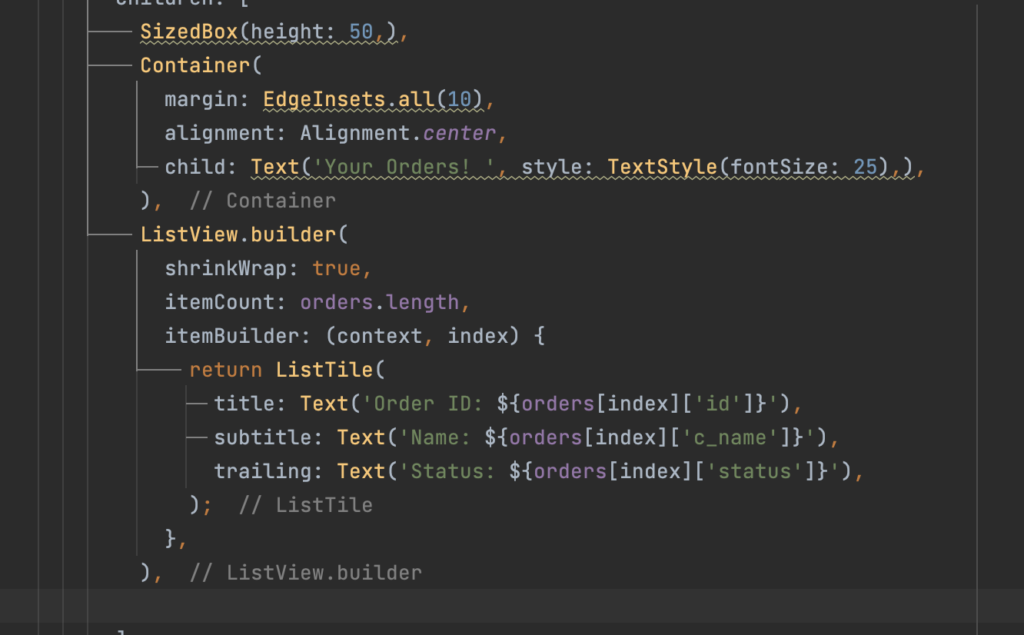
We will go to ListView Builder and change the trailing. While we will edit the status and bring it to the title.
title: Text('Order ID: ${orders[index]['id']} | Status: ${orders[index]['status']}'),And then we will add the two icons.
trailing: Row(
                    mainAxisSize: MainAxisSize.min,
                    children: [
                      IconButton(
                        icon: Icon(Icons.edit),
                        onPressed: () => editOrder(orders[index]['id']),
                      ),
                      IconButton(
                        icon: Icon(Icons.delete),
                        onPressed: () => deleteOrder(orders[index]['id']),
                      ),
                    ],
                  ),
Next, We have to create the functions for edit and delete.
  Future editOrder(int orderId) async {
    // Implement edit order functionality
  }

  Future deleteOrder(int orderId) async {
    // Implement delete order functionality
  }
Next, we will go to our control panel and create the delete order API page
prepare($query);
$stmt->bindParam(':order_id', $order_id);
$stmt->execute();

if ($stmt->rowCount() > 0) {
    $response = [
        'success' => true,
        'message' => 'Order deleted successfully',
    ];
} else {
    $response = [
        'success' => false,
        'message' => 'Failed to delete order',
    ];
}

// Send the response as JSON
header('Content-Type: application/json');
echo json_encode($response);
?>
Next, we will build the logout function in our app
Future deleteOrder(int orderId) async {
    try {
      // Replace 'your_api_endpoint' with the actual endpoint URL for deleting orders
      final url = Uri.parse('https://aboutassam.in/flutter_app/api/delete-order.php?order_id=$orderId');

      final response = await http.delete(url);

      if (response.statusCode == 200) {
        final responseData = json.decode(response.body);
        if (responseData['success'] == true) {
          // Order deleted successfully, navigate back to MyOrderScreen
          Navigator.push(
            context,
            MaterialPageRoute(builder: (context) => MyOrderScreen()),
          );
        } else {
          throw Exception(responseData['message']);
        }
      } else {
        throw Exception('Failed to delete order');
      }
    } catch (error) {
      print('Error deleting order: $error');
      // Handle error accordingly
    }
  }
Create a blank flutter screen called Edit order and we will shift the edit code to this screen
import 'package:flutter/cupertino.dart';

class EditOrder extends StatefulWidget {
  const EditOrder({super.key});

  @override
  State createState() => _EditOrderState();
}

Future editOrder(int orderId) async {
  // Implement edit order functionality
}
class _EditOrderState extends State {
  @override
  Widget build(BuildContext context) {
    return const Placeholder();
  }
}
We will then copy the codes from the checkout screen and paste them into the edit order screen
import 'package:ecommerce_app/orders/myOrders.dart';
import 'package:flutter/cupertino.dart';
import 'package:flutter/material.dart';
import 'package:http/http.dart' as http;
import 'package:shared_preferences/shared_preferences.dart';
import '../MyAccount/login.dart';
import '../MyAccount/thankyou.dart';

class EditOrder extends StatefulWidget {
  final int orderId;

  const EditOrder({Key? key, required this.orderId}) : super(key: key);

  @override
  State createState() => _EditOrderState();
}

Future editOrder(int orderId) async {
  // Implement edit order functionality
}

class _EditOrderState extends State {

//define all the variables

  final _formKey = GlobalKey();
  String selectedState = 'Select State';
  String userMobile = '';

  List indianStates = [
    'Select State',
    'Andhra Pradesh',
    'Arunachal Pradesh',
    'Assam',
    'Bihar',
    'Chhattisgarh',
    'Goa',
    'Gujarat',
    'Haryana',
    'Himachal Pradesh',
    'Jharkhand',
    'Karnataka',
    'Kerala',
    'Madhya Pradesh',
    'Maharashtra',
    'Manipur',
    'Meghalaya',
    'Mizoram',
    'Nagaland',
    'Odisha',
    'Punjab',
    'Rajasthan',
    'Sikkim',
    'Tamil Nadu',
    'Telangana',
    'Tripura',
    'Uttar Pradesh',
    'Uttarakhand',
    'West Bengal',
    // Rest of the states
  ];

  Widget _buildStateDropdown() {

    return DropdownButtonFormField(
      decoration: InputDecoration(
        labelText: 'Your State',
        border: OutlineInputBorder(
          borderRadius: BorderRadius.circular(50),
          borderSide: BorderSide(color: Colors.pink),
        ),
      ),
      value: selectedState,
      items: indianStates.map((state) {
        return DropdownMenuItem(
          value: state,
          child: Text(state),
        );
      }).toList(),
      onChanged: (value) {
        setState(() {
          selectedState = value!;
        });
      },
    );
  }

  @override
  void initState() {
    super.initState();

    _getUserInfo();
  }
  Future _getUserInfo() async {
    try {
      SharedPreferences prefs = await SharedPreferences.getInstance();
      String usermobile = prefs.getString('userMobile') ?? ''; // Get user email

      if (usermobile.isEmpty) {
        Navigator.push(
          context,
          MaterialPageRoute(
            builder: (context) => LoginScreen(),
          ),
        );
      } else {
        setState(() {
          userMobile = usermobile;
        });
      }
      ;
    } catch (error) {
      print('Error retrieving user info: $error');
    }
  }

  //Define Controllers Here

  TextEditingController yourName = TextEditingController();
  TextEditingController yourMobile = TextEditingController();
  TextEditingController yourAddress = TextEditingController();

  @override
  void dispose(){
    yourName.dispose();
    yourMobile.dispose();
    yourAddress.dispose();
    super.dispose();
  }

  @override
  Widget build(BuildContext context) {
    return Scaffold(
      appBar: AppBar(
        title: Text('Edit Order'),
        backgroundColor: Colors.pink,
      ),
      body: SingleChildScrollView(
        child: Column(
          children: [
            Container(
              margin: EdgeInsets.all(30),
              child: Image.network('https://aboutassam.in/flutter_app/assets/img/cart.png'),
            ),
            Container(
              child: Text('Edit Screen', style: TextStyle(fontSize: 30),),
            ),

            Form(

              key: _formKey,
              child: Column(
                children: [

                  _buildTextInputField('Your Name', yourName),
                  SizedBox(height: 10,),
                  _buildTextInputField('Your Mobile', yourMobile, userMobile : userMobile, readOnly: true),
                  SizedBox(height: 10,),
                  _buildStateDropdown(),
                  SizedBox(height: 10,),
                  _buildTextInputField('Your Address', yourAddress),
                  SizedBox(height: 10,),
                  ElevatedButton(
                      onPressed: (){
                        if(_formKey.currentState!.validate()){
                          sendDataToServer();
                        }

                      },
                      child: Text('Submit')
                  )

                ],
              )
              ,
            )
          ],
        ),
      ),
    );
  }

  void sendDataToServer () async {

    int orderId = widget.orderId;
    // Create a map of the form data.
    Map formData = {
      'name': yourName.text,
      'mobile': yourMobile.text,
      'state': selectedState,
      'address': yourAddress.text,
    };

    // Make an HTTP POST request to send the form data.
    final response = await http.post(
      Uri.parse('https://aboutassam.in/flutter_app/api/update-order.php?id=$orderId'),
      body: formData,
    );

    if (response.statusCode == 200) {
      print('Response===== ${response.body}');
      Navigator.push(context,
          MaterialPageRoute(
              builder: (context) => MyOrderScreen())
      );
    } else {
      print('Response===== ${response.body}');
    }
  }
}

Widget _buildTextInputField(

    String labelText, TextEditingController controller, {
      TextInputType inputType = TextInputType.text,
      String? Function(String?)? validator,
      String userMobile = '',
      bool readOnly = false,

    }) {

  if(labelText == 'Your Mobile'){

    controller.text = userMobile;
  }

  return TextFormField(
    controller: controller,
    enabled: !readOnly,
    decoration: InputDecoration(
      labelText: labelText,
      border: OutlineInputBorder(
        borderRadius: BorderRadius.circular(50),
        borderSide: BorderSide(color: Colors.pink),
      ),
    ),
    keyboardType: inputType,
    validator: validator,
  );
}
We will have to modify the edit button in my orders page
IconButton(
                        icon: Icon(Icons.edit),
                        onPressed: () {
                          int orderId = orders[index]['id'];
                          Navigator.push(
                            context,
                            MaterialPageRoute(
                              builder: (context) => EditOrder(orderId: orderId),
                            ),
                          );
                        },
                      ),
Create The Update / Edit API
prepare($sql);

    // Bind the parameters.
    $stmt->bindParam(':name', $c_name);
    $stmt->bindParam(':mobile', $c_mobile);
    $stmt->bindParam(':state', $c_state);
    $stmt->bindParam(':address', $c_address);
    $stmt->bindParam(':order_id', $order_id);

    if ($stmt->execute()) {
        $response['success'] = true;
        $response['message'] = "Data updated successfully.";
    } else {
        $response['success'] = false;
        $response['message'] = "Error: " . $stmt->errorInfo();
    }
} else {
    $response['success'] = false;
    $response['message'] = "Invalid request method.";
}

// Output the response as JSON.
echo json_encode($response);
?>
Complete Code of My Orders Screen
import 'dart:convert';

import 'package:flutter/cupertino.dart';
import 'package:flutter/material.dart';
import 'package:http/http.dart' as http;
import 'package:shared_preferences/shared_preferences.dart';

import '../MyAccount/login.dart';
import 'edit-order.dart';

class MyOrderScreen extends StatefulWidget {
  const MyOrderScreen({super.key});

  @override
  State createState() => _MyOrderScreenState();

}

class _MyOrderScreenState extends State {

  List> orders = [];

  String userMobile = '';

  @override
  void initState(){
    super.initState();
    _getUserInfo();
    fetchOrders();

  }

  Future _getUserInfo() async {
    try {
      SharedPreferences prefs = await SharedPreferences.getInstance();
      String usermobile = prefs.getString('userMobile') ?? ''; // Get user email

      if (usermobile.isEmpty) {
        Navigator.push(
          context,
          MaterialPageRoute(
            builder: (context) => LoginScreen(),
          ),
        );
      } else {
        setState(() {
          userMobile= usermobile;
        });
      }
      ;
    } catch (error) {
      print('Error retrieving user info: $error');
    }
  }

  Future fetchOrders() async {

    SharedPreferences prefs = await SharedPreferences.getInstance();
    String usermobile = prefs.getString('userMobile') ?? '';
    print(userMobile);
    print("==================");
    setState(() {
      userMobile= usermobile;
    });

    final response = await http.get(Uri.parse('https://aboutassam.in/flutter_app/api/fetch_orders.php?mobile=$userMobile'));
    if (response.statusCode == 200) {
      final responseData = json.decode(response.body);
      if (responseData['success'] == true) {
        setState(() {
          orders = List>.from(responseData['orders']);
        });
      } else {
        throw Exception(responseData['message']);
      }
    } else {
      throw Exception('Failed to load orders');
    }
  }

  Future deleteOrder(int orderId) async {
    try {
      // Replace 'your_api_endpoint' with the actual endpoint URL for deleting orders
      final url = Uri.parse('https://aboutassam.in/flutter_app/api/delete-order.php?order_id=$orderId');

      final response = await http.delete(url);

      if (response.statusCode == 200) {
        final responseData = json.decode(response.body);
        if (responseData['success'] == true) {
          // Order deleted successfully, navigate back to MyOrderScreen
          Navigator.push(
            context,
            MaterialPageRoute(builder: (context) => MyOrderScreen()),
          );
        } else {
          throw Exception(responseData['message']);
        }
      } else {
        throw Exception('Failed to delete order');
      }
    } catch (error) {
      print('Error deleting order: $error');
      // Handle error accordingly
    }
  }

  @override
  Widget build(BuildContext context) {
    return Scaffold(
      appBar: AppBar(
        title: Text('My Orders'),
        backgroundColor: Colors.pink,
      ),
      body: SingleChildScrollView(
        child: Column(
          children: [
            SizedBox(height: 50,),
            Container(
              margin: EdgeInsets.all(10),
              alignment: Alignment.center,
              child: Text('Your Orders! ', style: TextStyle(fontSize: 25),),
            ),
            ListView.builder(
              shrinkWrap: true,
              itemCount: orders.length,
              itemBuilder: (context, index) {
                return ListTile(
                  title: Text('Order ID: ${orders[index]['id']} | Status: ${orders[index]['status']}'),
                  subtitle: Text('Name: ${orders[index]['c_name']}'),
                  trailing: Row(
                    mainAxisSize: MainAxisSize.min,
                    children: [
                      IconButton(
                        icon: Icon(Icons.edit),
                        onPressed: () {
                          int orderId = orders[index]['id'];
                          Navigator.push(
                            context,
                            MaterialPageRoute(
                              builder: (context) => EditOrder(orderId: orderId),
                            ),
                          );
                        },
                      ),
                      IconButton(
                        icon: Icon(Icons.delete),
                        onPressed: () => deleteOrder(orders[index]['id']),
                      ),
                    ],
                  ),
                );
              },
            ),

          ],
        ),
      ),
    );
  }
}
Complete Code of Edit Orders Screen
import 'package:ecommerce_app/orders/myOrders.dart';
import 'package:flutter/cupertino.dart';
import 'package:flutter/material.dart';
import 'package:http/http.dart' as http;
import 'package:shared_preferences/shared_preferences.dart';
import '../MyAccount/login.dart';
import '../MyAccount/thankyou.dart';

class EditOrder extends StatefulWidget {
  final int orderId;

  const EditOrder({Key? key, required this.orderId}) : super(key: key);

  @override
  State createState() => _EditOrderState();
}

Future editOrder(int orderId) async {
  // Implement edit order functionality
}

class _EditOrderState extends State {

//define all the variables

  final _formKey = GlobalKey();
  String selectedState = 'Select State';
  String userMobile = '';

  List indianStates = [
    'Select State',
    'Andhra Pradesh',
    'Arunachal Pradesh',
    'Assam',
    'Bihar',
    'Chhattisgarh',
    'Goa',
    'Gujarat',
    'Haryana',
    'Himachal Pradesh',
    'Jharkhand',
    'Karnataka',
    'Kerala',
    'Madhya Pradesh',
    'Maharashtra',
    'Manipur',
    'Meghalaya',
    'Mizoram',
    'Nagaland',
    'Odisha',
    'Punjab',
    'Rajasthan',
    'Sikkim',
    'Tamil Nadu',
    'Telangana',
    'Tripura',
    'Uttar Pradesh',
    'Uttarakhand',
    'West Bengal',
    // Rest of the states
  ];

  Widget _buildStateDropdown() {

    return DropdownButtonFormField(
      decoration: InputDecoration(
        labelText: 'Your State',
        border: OutlineInputBorder(
          borderRadius: BorderRadius.circular(50),
          borderSide: BorderSide(color: Colors.pink),
        ),
      ),
      value: selectedState,
      items: indianStates.map((state) {
        return DropdownMenuItem(
          value: state,
          child: Text(state),
        );
      }).toList(),
      onChanged: (value) {
        setState(() {
          selectedState = value!;
        });
      },
    );
  }

  @override
  void initState() {
    super.initState();

    _getUserInfo();
  }
  Future _getUserInfo() async {
    try {
      SharedPreferences prefs = await SharedPreferences.getInstance();
      String usermobile = prefs.getString('userMobile') ?? ''; // Get user email

      if (usermobile.isEmpty) {
        Navigator.push(
          context,
          MaterialPageRoute(
            builder: (context) => LoginScreen(),
          ),
        );
      } else {
        setState(() {
          userMobile = usermobile;
        });
      }
      ;
    } catch (error) {
      print('Error retrieving user info: $error');
    }
  }

  //Define Controllers Here

  TextEditingController yourName = TextEditingController();
  TextEditingController yourMobile = TextEditingController();
  TextEditingController yourAddress = TextEditingController();

  @override
  void dispose(){
    yourName.dispose();
    yourMobile.dispose();
    yourAddress.dispose();
    super.dispose();
  }

  @override
  Widget build(BuildContext context) {
    return Scaffold(
      appBar: AppBar(
        title: Text('Edit Order'),
        backgroundColor: Colors.pink,
      ),
      body: SingleChildScrollView(
        child: Column(
          children: [
            Container(
              margin: EdgeInsets.all(30),
              child: Image.network('https://aboutassam.in/flutter_app/assets/img/cart.png'),
            ),
            Container(
              child: Text('Edit Screen', style: TextStyle(fontSize: 30),),
            ),

            Form(

              key: _formKey,
              child: Column(
                children: [

                  _buildTextInputField('Your Name', yourName),
                  SizedBox(height: 10,),
                  _buildTextInputField('Your Mobile', yourMobile, userMobile : userMobile, readOnly: true),
                  SizedBox(height: 10,),
                  _buildStateDropdown(),
                  SizedBox(height: 10,),
                  _buildTextInputField('Your Address', yourAddress),
                  SizedBox(height: 10,),
                  ElevatedButton(
                      onPressed: (){
                        if(_formKey.currentState!.validate()){
                          sendDataToServer();
                        }

                      },
                      child: Text('Submit')
                  )

                ],
              )
              ,
            )
          ],
        ),
      ),
    );
  }

  void sendDataToServer () async {

    int orderId = widget.orderId;
    // Create a map of the form data.
    Map formData = {
      'name': yourName.text,
      'mobile': yourMobile.text,
      'state': selectedState,
      'address': yourAddress.text,
    };

    // Make an HTTP POST request to send the form data.
    final response = await http.post(
      Uri.parse('https://aboutassam.in/flutter_app/api/update-order.php?id=$orderId'),
      body: formData,
    );

    if (response.statusCode == 200) {
      print('Response===== ${response.body}');
      Navigator.push(context,
          MaterialPageRoute(
              builder: (context) => MyOrderScreen())
      );
    } else {
      print('Response===== ${response.body}');
    }
  }
}

Widget _buildTextInputField(

    String labelText, TextEditingController controller, {
      TextInputType inputType = TextInputType.text,
      String? Function(String?)? validator,
      String userMobile = '',
      bool readOnly = false,

    }) {

  if(labelText == 'Your Mobile'){

    controller.text = userMobile;
  }

  return TextFormField(
    controller: controller,
    enabled: !readOnly,
    decoration: InputDecoration(
      labelText: labelText,
      border: OutlineInputBorder(
        borderRadius: BorderRadius.circular(50),
        borderSide: BorderSide(color: Colors.pink),
      ),
    ),
    keyboardType: inputType,
    validator: validator,
  );
}
Exclusive Discount Offer
Inquire for Course Fee & Discounts
Get full program details, syllabus breakdown, and claim your exclusive course fee discount for the Best Digital Marketing Course in Guwahati.