How to create A Flutter App in Android Studio in 3 Mins?
By Webotapp Academy•
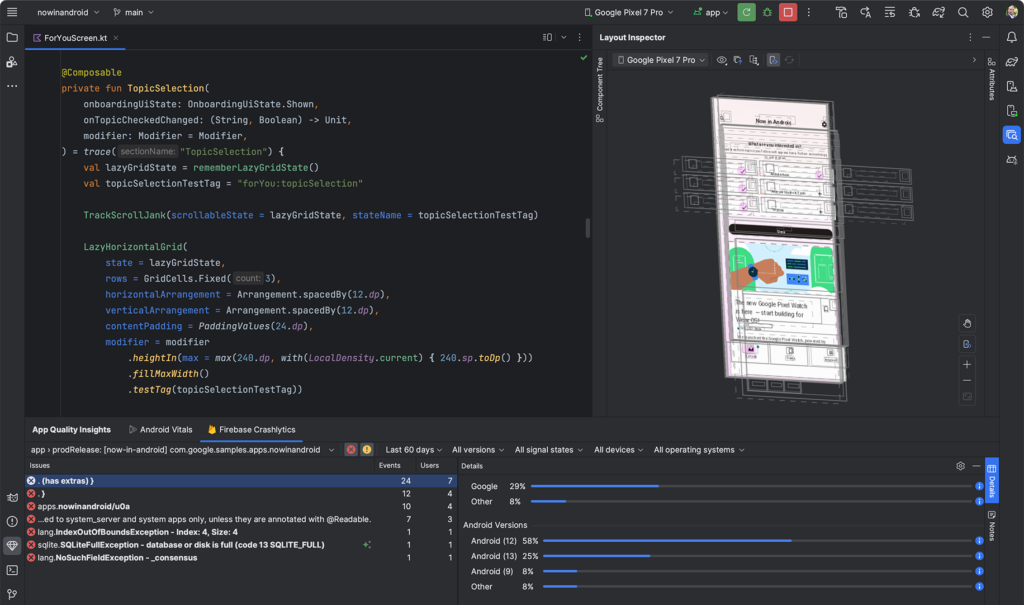
<!-- wp:paragraph {\"align\":\"left\"} -->\n<p class=\"has-text-align-left\">In this tutorial of 'How To Create A Flutter App in Android Studio' we shall learn from right from installing a flutter application in your system to the creation of your first app. So without wasting much time, let us dive directly to the lecture.</p>\n<!-- /wp:paragraph -->\n\n<!-- wp:embed {\"url\":\"https://www.youtube.com/watch?v=UCgtOmhnIMY\",\"type\":\"video\",\"providerNameSlug\":\"youtube\",\"responsive\":true,\"className\":\"wp-embed-aspect-4-3 wp-has-aspect-ratio\"} -->\n<figure class=\"wp-block-embed is-type-video is-provider-youtube wp-block-embed-youtube wp-embed-aspect-4-3 wp-has-aspect-ratio\">\n<div class=\"wp-block-embed__wrapper\">https://www.youtube.com/watch?v=UCgtOmhnIMY</div>\n</figure>\n<!-- /wp:embed -->\n\n<!-- wp:paragraph -->\n<p>Let us break the topics of the video step by step.</p>\n<!-- /wp:paragraph -->\n\n<!-- wp:heading -->\n<h2 class=\"wp-block-heading\">Step 1: What is Flutter?</h2>\n<!-- /wp:heading -->\n\n<!-- wp:paragraph -->\n<p><a href=\"https://flutter.dev/\">Flutter</a> is a cross-platform UI development kit with the help of which we can create applications for Android, iOS, Linux, macOS, Windows and web. Flutter is being developed by <a href=\"https://developers.google.com/learn/pathways/intro-to-flutter\">Google</a> and it is now one of the most fastest growing app development UI kits.</p>\n<!-- /wp:paragraph -->\n\n<!-- wp:heading -->\n<h2 class=\"wp-block-heading\">Step 2: Install Flutter in Your Computer</h2>\n<!-- /wp:heading -->\n\n<!-- wp:paragraph -->\n<p>In order to install <a href=\"https://academy.webotapp.com/launch-flutter-app-in-ios-app-store/\" data-type=\"post\" data-id=\"5187\">Flutter</a> SDK in your computer you have to visit <a href=\"https://docs.flutter.dev/get-started/install\">Flutter official documentation</a>. (https://docs.flutter.dev/get-started/install). Once you visit the page, simply follow the instruction wizard, by selecting your operating system and other requirements.</p>\n<!-- /wp:paragraph -->\n\n<!-- wp:heading -->\n<h2 class=\"wp-block-heading\">Step 3: Create A First Flutter App in Android Studio</h2>\n<!-- /wp:heading -->\n\n<!-- wp:image {\"id\":5258,\"sizeSlug\":\"large\",\"linkDestination\":\"none\"} -->\n<figure class=\"wp-block-image size-large\"><img class=\"wp-image-5258\" src=\"https://academy.webotapp.com/wp-content/uploads/2024/06/How-to-create-A-Flutter-App-in-Android-Studio-in-10-Mins-1024x605.png\" alt=\"How to create A Flutter App in Android Studio in 10 Mins\" /></figure>\n<!-- /wp:image -->\n\n<!-- wp:paragraph -->\n<p>Download and install the latest version of <a href=\"https://developer.android.com/studio\">android studio</a>, if it is not previously installed in your computer.</p>\n<!-- /wp:paragraph -->\n\n<!-- wp:paragraph -->\n<p>Next, create a flutter app in Android Studio using two methods.</p>\n<!-- /wp:paragraph -->\n\n<!-- wp:paragraph -->\n<p>First, by directly using the IDE and next by using a terminal or command prompt.</p>\n<!-- /wp:paragraph -->\n\n<!-- wp:paragraph -->\n<p>In the video below, I will show you how to create a flutter app using Android Studio IDE by direct method</p>\n<!-- /wp:paragraph -->\n\n<!-- wp:embed {\"url\":\"https://www.youtube.com/watch?v=UCgtOmhnIMY\",\"type\":\"video\",\"providerNameSlug\":\"youtube\",\"responsive\":true,\"className\":\"wp-embed-aspect-4-3 wp-has-aspect-ratio\"} -->\n<figure class=\"wp-block-embed is-type-video is-provider-youtube wp-block-embed-youtube wp-embed-aspect-4-3 wp-has-aspect-ratio\">\n<div class=\"wp-block-embed__wrapper\">https://www.youtube.com/watch?v=UCgtOmhnIMY</div>\n</figure>\n<!-- /wp:embed -->\n\n<!-- wp:paragraph -->\n<p><strong>In the second method, we will create the flutter app using the terminal. </strong></p>\n<!-- /wp:paragraph -->\n\n<!-- wp:embed {\"url\":\"https://www.youtube.com/watch?v=MqAoUyYBrKI\\u0026ab_channel=WeBotApp\",\"type\":\"video\",\"providerNameSlug\":\"youtube\",\"responsive\":true,\"className\":\"wp-embed-aspect-16-9 wp-has-aspect-ratio\"} -->\n<figure class=\"wp-block-embed is-type-video is-provider-youtube wp-block-embed-youtube wp-embed-aspect-16-9 wp-has-aspect-ratio\">\n<div class=\"wp-block-embed__wrapper\">https://www.youtube.com/watch?v=MqAoUyYBrKI&ab_channel=WeBotApp</div>\n</figure>\n<!-- /wp:embed -->\n\n<!-- wp:paragraph -->\n<p><strong>The above video explains how to create a flutter app in android studio using terminal</strong></p>\n<!-- /wp:paragraph -->\n\n<!-- wp:list -->\n<ul><!-- wp:list-item -->\n<li>Create The folder on desktop or use terminal command such as mkdir FOLDER_NAME</li>\n<!-- /wp:list-item -->\n\n<!-- wp:list-item -->\n<li>Navigate to the folder you have just created using cd command</li>\n<!-- /wp:list-item -->\n\n<!-- wp:list-item -->\n<li>Run the command flutter to create app_name</li>\n<!-- /wp:list-item -->\n\n<!-- wp:list-item -->\n<li>Open Android Studio</li>\n<!-- /wp:list-item -->\n\n<!-- wp:list-item -->\n<li>Run the emulator device</li>\n<!-- /wp:list-item -->\n\n<!-- wp:list-item -->\n<li>Run the app in your emulator</li>\n<!-- /wp:list-item --></ul>\n<!-- /wp:list -->\n\n<!-- wp:heading -->\n<h2 class=\"wp-block-heading\">Conclusion: Create A Flutter App in Android Studio</h2>\n<!-- /wp:heading -->\n\n<!-- wp:paragraph -->\n<p>In this article we have learned how to create a flutter app in android studio. If you want to learn how to create a flutter app in <a href=\"https://code.visualstudio.com/\">Visual Studio Code</a>, click here.</p>\n<!-- /wp:paragraph -->\n\n<!-- wp:image {\"id\":5260,\"sizeSlug\":\"large\",\"linkDestination\":\"none\"} -->\n<figure class=\"wp-block-image size-large\"><img class=\"wp-image-5260\" src=\"https://academy.webotapp.com/wp-content/uploads/2024/06/home-screenshot-mac-2x-v2-1024x650.png\" alt=\"Create Flutter App in Android Studio\" /></figure>\n<!-- /wp:image -->\n\n<!-- wp:paragraph -->\n<p>If you are interested to learn more about flutter app development, simply visit WeBotApp Academy's Youtube Channel where we have a complete playlist of <a href=\"https://www.youtube.com/playlist?list=PLGbr602hk07XynxBo3_KQYSd4DDXwixID\">Flutter Web & App development</a>. The speciality of this course is that we have used, PHP and MySQL at the backend to store and process user data.</p>\n<!-- /wp:paragraph -->\n\n<!-- wp:paragraph -->\n<p>WeBotApp academy not only offer the courses related to mobile application development, but also offers website development courses and advanced digital marketing courses. These courses are being offered by 12+ years experienced industry professionals. These courses comes with 100% job assiatnces</p>\n<!-- /wp:paragraph -->\n\n<!-- wp:paragraph -->\n<p>Thank you for reading. If you have any doubt or confusion on how to create a flutter app in android studio, kindly ask your question in the comment box below.</p>\n<!-- /wp:paragraph -->